

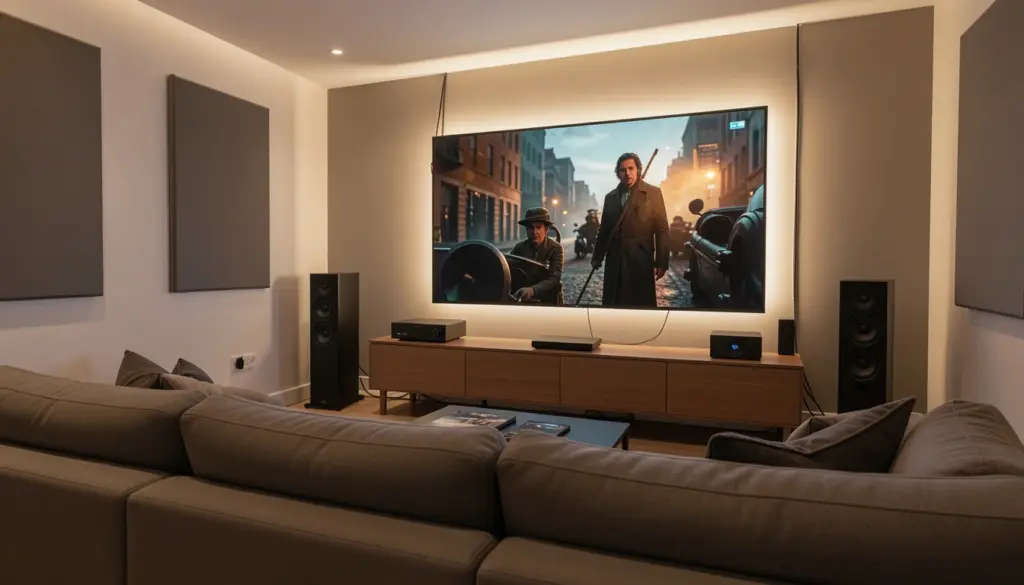
Most home theaters underperform—not because of cheap equipment, but because of poor planning. Speakers placed in the wrong spots, a TV sized incorrectly for the room, or a subwoofer tucked into a corner can turn even expensive gear into a mediocre experience. The good news is that a well-planned setup at $500 can outperform a carelessly assembled $3,000 system.
This guide walks you through every stage of building a home theater: choosing the right display, selecting an audio system that fits your space, planning a budget that makes sense, placing speakers correctly, and fine-tuning the setup for the best possible performance. Whether you’re working with a dedicated room or a small apartment living space, the same principles apply.
What You Need for a Complete Home Theater Setup
A home theater system has four core categories of components:
Display: The visual centerpiece—either a large TV or a projector and screen combination.
Audio system: This ranges from a simple soundbar to a full surround sound configuration with an AV receiver, multiple speakers, and a subwoofer.
Source device: Whatever feeds content into your system—a Blu-ray player, streaming device (such as a Fire TV Stick or Chromecast), gaming console, or media server.
Accessories: HDMI cables, power management strips, mounting hardware, acoustic treatment, and lighting control.
Getting these four categories right—and making sure they work together—is the foundation of a good home cinema setup. Every decision you make in one category affects the others.
Choosing the Right Display: TV vs Projector
The display choice is often the most debated part of any home theater system setup, and for good reason—it shapes everything from room layout to budget allocation.
TVs offer consistent image quality regardless of ambient light, a simpler setup, and no lamp replacement costs. An OLED TV delivers exceptional contrast, deep blacks, and wide viewing angles, making it the preferred choice for dark or moderately lit rooms. QLED TVs offer higher peak brightness, which makes them better suited for brighter environments. For most people, a 65–85 inch TV represents the practical sweet spot between screen size and cost.
Projectors let you achieve screen sizes of 100 inches or more for less money than a comparable TV, which creates a more immersive cinematic experience. The trade-off is ambient light sensitivity—most projectors require a darkened room to produce a sharp, high-contrast image. Throw distance matters too: a short-throw projector works in tight spaces, while standard throw models need several feet of clearance.
Room size and viewing distance play a significant role in this decision. For a 4K display, the general guideline is to sit roughly 1 to 1.5 times the screen’s diagonal measurement away from the screen. A 75-inch TV works well from about 7–9 feet. If your room allows for 10–14 feet of viewing distance and you want the largest possible image, a projector becomes genuinely appealing.
Selecting the Best Audio System
Audio is where most home theaters either succeed or fall flat. A great picture with mediocre sound will always feel unsatisfying. Understanding your options clearly makes the decision much easier.
Soundbar vs Surround Sound System
A soundbar is a compact, single-unit speaker system that sits below or above the TV. Modern soundbars have improved dramatically, and many support virtual surround sound processing. They work well for smaller rooms, casual viewing, or situations where running speaker wire is impractical—such as home theater setups in apartments or rented spaces.
A full surround sound system with separate speakers and an AV receiver delivers a genuinely different experience. The spatial separation of sound sources—dialogue from the center channel, effects from the sides, and bass from the subwoofer—creates a sound field that a soundbar can approximate but not fully replicate. If you want true surround sound immersion, a multi-speaker configuration is the way to get there.
Understanding 2.1, 5.1, and 7.1 Systems
The numbers describe speaker configuration. The first number is the count of full-range speakers; the second represents the number of subwoofers.
A 2.1 system (two speakers plus a subwoofer) is the entry point for quality stereo audio with bass. It’s a reasonable upgrade from a soundbar and works well in smaller spaces.
A 5.1 surround sound system adds a center channel speaker and two rear surround speakers to the 2.1 setup. This is the standard configuration for most home theaters and covers the majority of film audio formats effectively.
A 7.1 system includes two additional side surround channels for a wider soundstage. It’s most beneficial in larger rooms where there’s enough physical space between the listener and the rear walls.
Dolby Atmos and DTS:X are object-based audio formats that add height channels—either through ceiling-mounted speakers or upward-firing drivers on floor speakers. Dolby Atmos support is now common across mid-range AV receivers and streaming services, and the difference in overhead sound effects is noticeable.
Budget Planning: Build a Setup That Fits Your Wallet
Budget planning is where many beginners go wrong—either overspending on a single component or spreading money too thin across everything. Here’s a practical framework based on three tiers.
Entry-Level Setup (Under $800)
- 55–65″ 4K TV from a reliable brand
- Soundbar with a wireless subwoofer (Dolby Atmos-compatible models are available in this range)
- Streaming device (if the TV’s built-in platform is insufficient)
- Quality HDMI 2.1 cables
This setup provides a solid audio-visual experience without complexity. It’s ideal for apartments, smaller rooms, or first-time buyers building toward something larger.
Mid-Range Setup ($800–$2,500)
- 65–75″ OLED or QLED TV
- Entry AV receiver with Dolby Atmos support
- 5.1 speaker package from a reputable audio brand
- Blu-ray player or high-end streaming device
- Basic acoustic panels and blackout curtains
At this level, the difference in audio quality over a soundbar becomes very clear. The investment in separate speakers and an AV receiver pays off in balanced sound output and long-term flexibility—you can upgrade individual components over time.
Premium Setup ($2,500+)
- 77″+ OLED TV or 4K laser projector with a dedicated screen
- Mid-to-high-end AV receiver supporting 7.1.4 Dolby Atmos
- Floor-standing front speakers, dedicated center, surround, and height channels
- Powered subwoofer for deep, controlled bass response
- Full acoustic treatment (panels, bass traps, diffusers)
At this tier, every component earns its place. The focus shifts from getting the basics right to extracting maximum performance from the room itself.
The most important buying priority at any level: spend more on speakers and less on cables. Expensive cables rarely make an audible difference; quality speakers always do.
Speaker Placement and Room Layout
Proper placement is the single biggest variable in how a system sounds. Even high-end speakers placed incorrectly will produce muddy, unbalanced audio.
Front left and right speakers should be angled inward (toed in) toward the primary listening position, typically forming a triangle with equal sides between the listener and each speaker. Position them at ear level when seated, or as close to it as possible.
The center channel speaker should sit directly above or below the TV, aimed at the listener’s ear level. Since it handles the majority of on-screen dialogue, accurate placement prevents voices from sounding disconnected from the picture.
Surround speakers in a 5.1 system should be placed to the sides of the listening position, slightly behind, at ear level, or slightly above. In a 7.1 configuration, the additional pair goes directly to the sides.
Subwoofer positioning affects bass response more than most people realize. Bass frequencies are omnidirectional, so the subwoofer doesn’t need to face the listener directly. The “subwoofer crawl” method—placing the subwoofer at your listening position and crawling around the room while playing bass-heavy content until you find the spot where bass sounds most even—is an old technique that still works well.
Viewing distance should match your screen size. Sitting too close to a large screen causes eye strain; sitting too far reduces the sense of immersion. For most 65–75″ TVs, a distance of 8–10 feet provides a satisfying field of view.
Essential Equipment and Accessories
AV receiver: The hub of any multi-speaker setup. It decodes audio formats (Dolby Atmos, DTS:X), amplifies speaker channels, and manages video switching. Look for HDMI ARC or eARC support, which allows audio to pass back from the TV to the receiver over a single HDMI cable.
Streaming devices: Many smart TV platforms are capable enough on their own, but dedicated devices like a Fire TV Stick 4K Max or Apple TV 4K often provide faster performance, more app support, and better codec handling.
Cables: HDMI 2.1 cables support 4K at 120Hz and are worth using if your TV and source devices support those specifications. For speaker wire, 16-gauge is sufficient for most setups; 14-gauge is better for longer runs or high-power systems.
Power conditioning: A quality surge protector or power conditioner protects your equipment from voltage spikes. It’s a small investment compared to the cost of replacing a damaged AV receiver or TV.
Step-by-Step Home Theater Setup Guide
Step 1 — Position and mount the display. Determine the optimal height for your TV or projector screen. For wall-mounted TVs, the center of the screen should align with seated eye level. Avoid mounting too high—it causes neck strain during long viewing sessions.
Step 2 — Connect the AV receiver. Run an HDMI cable from each source device (streaming device, Blu-ray player, gaming console) into the receiver’s HDMI inputs. Connect the receiver to the TV using an HDMI ARC/eARC cable for two-way audio communication.
Step 3 — Install and wire the speakers. Follow the placement guidelines above. Label each speaker wire to avoid confusion. Most AV receivers label terminals clearly (FL, FR, C, SL, SR, SW).
Step 4 — Run the auto-calibration. Most modern AV receivers include an automatic speaker calibration system (Audyssey, YPAO, or MCACC). Place the included microphone at your listening position and run the calibration. This process measures room acoustics, adjusts speaker levels, and sets distance delays—all of which significantly improve sound quality.
Step 5 — Test and adjust. Play a variety of content—dialogue-heavy scenes, action sequences, and music—to evaluate balance. Adjust individual channel levels manually if certain speakers feel too loud or too quiet.
Improving Your Home Theater Experience
Lighting control has a meaningful impact on perceived picture quality. Bias lighting—a strip of LED light placed behind the TV—reduces eye strain and improves contrast perception without washing out the image. Blackout curtains or blinds eliminate reflections and glare during daytime viewing.
Room acoustics determine how sound behaves in your space. Hard surfaces like bare walls, wood floors, and large windows reflect sound and create harsh echoes. Acoustic panels on the side walls at reflection points, a thick rug on the floor, and soft furnishings all help absorb excess reflections. Bass traps in room corners address low-frequency buildup, which is a common cause of boomy or uneven bass response.
Regular calibration is worth revisiting if you rearrange furniture, add acoustic treatment, or upgrade speakers. Room conditions change, and the auto-calibration process takes only a few minutes.
Common Mistakes to Avoid
Placing all speakers at the front. Many beginners place all their speakers near the TV. Surround sound only works when speakers are actually surrounding the listener.
Skipping the subwoofer. A good subwoofer doesn’t just add bass—it frees the main speakers from reproducing low frequencies, which improves overall clarity and detail.
Buying expensive HDMI cables over acoustic treatment. A $50 HDMI cable sounds identical to a $5 one at standard lengths. That same $45 difference spent on acoustic panels will produce a clearly audible improvement.
Choosing the wrong TV size for the room. A 50″ TV in a room where viewers sit 12 feet away loses the immersive quality that makes home cinema worthwhile. Use screen-size-to-distance calculators before purchasing.
Ignoring the AV receiver’s configuration settings. An uncalibrated receiver with mismatched speaker sizes and levels will underperform regardless of how good the hardware is.
FAQs
What do I need for a basic home theater setup?
At minimum: a large 4K TV, a soundbar with a subwoofer, and a streaming device or Blu-ray player. This gives you a functional home cinema setup without significant complexity or cost.
Is a soundbar enough for a home theater?
For casual viewing in smaller rooms, yes. For a genuinely immersive surround sound experience, a dedicated 5.1 system with an AV receiver produces noticeably better spatial audio.
How far should I sit from my TV?
For 4K content, sitting 1 to 1.5 times the screen’s diagonal measurement away is generally recommended. For a 65″ TV, that means roughly 6.5 to 9.5 feet.
What is the difference between 5.1 and 7.1 surround sound?
A 5.1 system has five speakers (front left, front right, center, two surrounds) and one subwoofer. A 7.1 system adds two additional side-surround speakers for a wider sound field, which benefits larger rooms more than smaller ones.
Do I need an AV receiver?
If you’re using a soundbar, no. If you want to run multiple separate speakers with full surround sound decoding and Dolby Atmos support, an AV receiver is essential.
Can I build a home theater in a small room or apartment?
Yes. A well-placed soundbar, a properly sized TV, and some basic room treatment can deliver a strong cinematic experience even in limited spaces. A 2.1 system with bookshelf speakers is another practical option for smaller areas.
How much does a home theater system cost?
A functional entry-level setup can be assembled for $500–$800. A mid-range system with separate speakers and an AV receiver typically runs $1,000–$2,500. Premium configurations with high-end audio and display components go well beyond that, depending on room size and equipment choices.